The Customer Portal for Natural Stone
Make the entire slab inventory accessible online, available 24/7, worldwide. Customers browse the gallery independently, see high-resolution slab photos and submit inquiries directly. DDL turns the physical warehouse into a digital sales channel, from dealer to end customer.
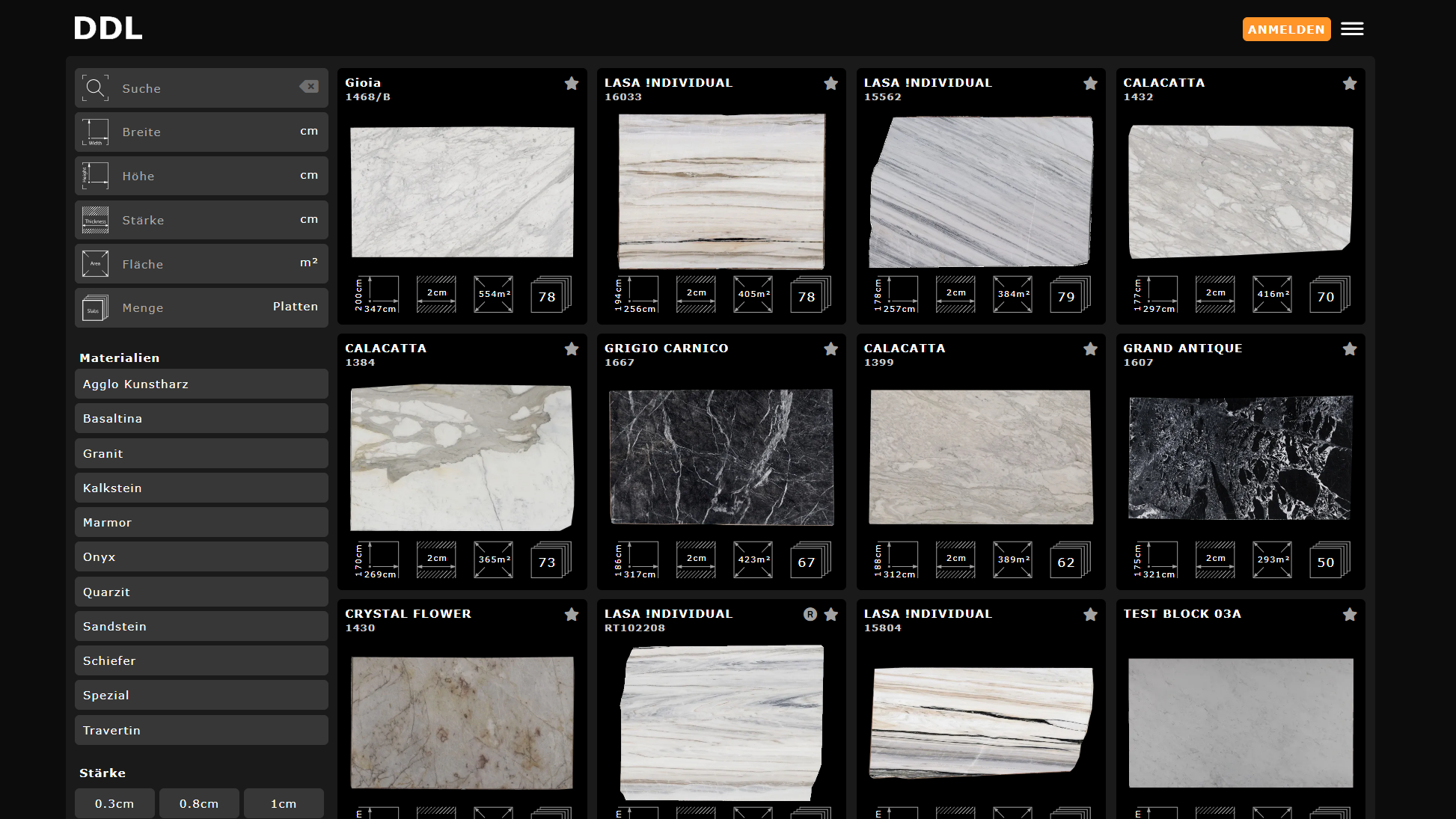


What a customer portal brings to the business
A customer portal opens sales channels that a physical showroom alone cannot provide.
Online visibility for inventory
The entire inventory is visible online around the clock, not just during business hours. More reach, more qualified inquiries and shorter paths to the right material.
Save time through customer self-service
Customers browse the inventory themselves, filtering by color, material and dimensions. Sales focuses on qualified inquiries instead of stock questions.
Build partner networks
Suppliers are invited digitally, their material appears in the gallery even though it is physically at the supplier's location. The offering expands without additional warehouse space.
Intuitive search and filters
Industry-specific filters by color, material group, dimensions, surface and availability enable targeted material selection, tailored to the requirements of the natural stone industry.
From inventory directly to planning
Customers can take slabs directly from the gallery into project planning, if DXF data is available. The bridge between warehouse and job site.
Create quotes and shopping carts
From the gallery, customers submit material inquiries, create shopping carts and share them via link or email. Sales creates professional quotes based on to-scale data.
How slabs get into the gallery
From photo to online gallery, multiple paths, one result.
Smartphone photography
Photograph slabs and blocks with a smartphone, crop them and upload directly to the gallery. AI-based contour recognition processes contours and calculates dimensions automatically. No competitor offers this direct path from phone to presentation-ready gallery.
Photo booth / photo station
A fixed photo station in the warehouse ensures consistent lighting and consistently professional results. The higher image quality and color precision make the photo booth ideal when slabs need to be displayed side by side in project planning.
Scanner integration & AI processing
High-resolution slab scanners deliver precise images and measurements during the production process. Ideal for high throughput, e.g. directly after the polishing line. DDL integrates scan data automatically into inventory and gallery. AI-path and masking workflows process photos automatically, clean cutouts, consistent presentation and automatic preview generation.
Three levels: Supplier, Dealer, End Customer
The online inventory serves the entire value chain, from quarry to kitchen studio.
Dealers show the gallery to their customers
Natural stone dealers use the gallery to present available material to their own customers, such as kitchen studios or architects.
Kitchen studios show end customers the selection
The kitchen studio accesses the same gallery and shows the end customer the material selection for their countertop, live, visual, current.
Three levels, one system
Supplier provides material, dealer distributes it, end customer selects. DDL connects all three levels in one seamless gallery.
Differentiated price visibility
DDL maps individually agreed trade conditions and controls access to the gallery.
Public: discover material
In the public gallery, the material takes center stage: search, filter, find the right slab and start an inquiry directly.
Logged in: individual prices
Logged-in partners see their individual prices with discounts and terms configured specifically for them.
Gallery by invitation
The entire gallery can optionally be made public or accessible by invitation only. A global setting, not a partial area. Invited partners receive access and can submit inquiries directly.
Cross-company material inventory
Expand the offering through digital partnerships, without physical logistics.
Invite partners digitally
Partners are invited via DDL. Their material appears in the gallery, even though it is physically at the partner's location.
Larger assortment without warehouse
Through partner networks, a more diverse material selection emerges for customers. More variety, higher inventory diversity, with the same infrastructure.
Material for sales, quotes and planning
Partner material is not just in the gallery, it can flow directly into quotes, projects and planning. Through DDL, real partner ecosystems form: quarries, dealers, fabricators and sales partners all work on the same platform.
What customers can do in the gallery
The online gallery is more than a catalog, it is an active sales channel.
Create and share shopping cart
Customers compile a shopping cart and share it via link or email, ideal for coordination and quote requests.
Request quotes
From the shopping cart or material selection, a quote can be requested directly. All relevant data is already included.
Share material
Individual slabs can be shared directly from the gallery via link, email or messenger to colleagues, customers or decision-makers.
Digital inventory at trade shows and in the field
Show the entire inventory on a tablet, anywhere.
Digital warehouse at the booth
Show potential customers the entire inventory digitally, on tablet or screen. Modern, professional and without transporting a single slab.
Modern impression on prospects
A digital inventory with high-resolution photos and filter options leaves a lasting impression on potential buyers.
Hand over digital inventory
After the conversation, the digital inventory is shared via link, the prospect can immediately browse and inquire independently.
Full control over every slab
Precise control over what is visible to whom.
Internal only
Slabs can be marked as internal only, they then appear only in the warehouse management system, not in the public gallery.
Prioritize and deprioritize
Show certain materials first or move them further back. Control what customers see first.
Project or direct sale
Assign slabs to project business or direct sale, or both. The gallery filters accordingly. All visibility settings apply per block and per individual slab, maximum flexibility in control.
Four steps to a digital warehouse
From digitization to the first customer order, this is how fast it goes.
Digitize inventory
Capture slabs and blocks with smartphone, photo station or scanner. DDL AI creates to-scale digital objects, automatically and in seconds per slab.
Set up gallery
Customize corporate design, configure filters, define visibility and pricing per customer group. The gallery looks like the company website.
Go online
Embed the gallery in the website or run it as a standalone portal. Customers browse the inventory 24/7, worldwide, on any device.
Customer interaction
Inquiries, shopping carts and quote requests arrive directly. Customers work independently on the platform, find material, submit inquiries and receive quotes based on real slab dimensions.
All features of the customer portal
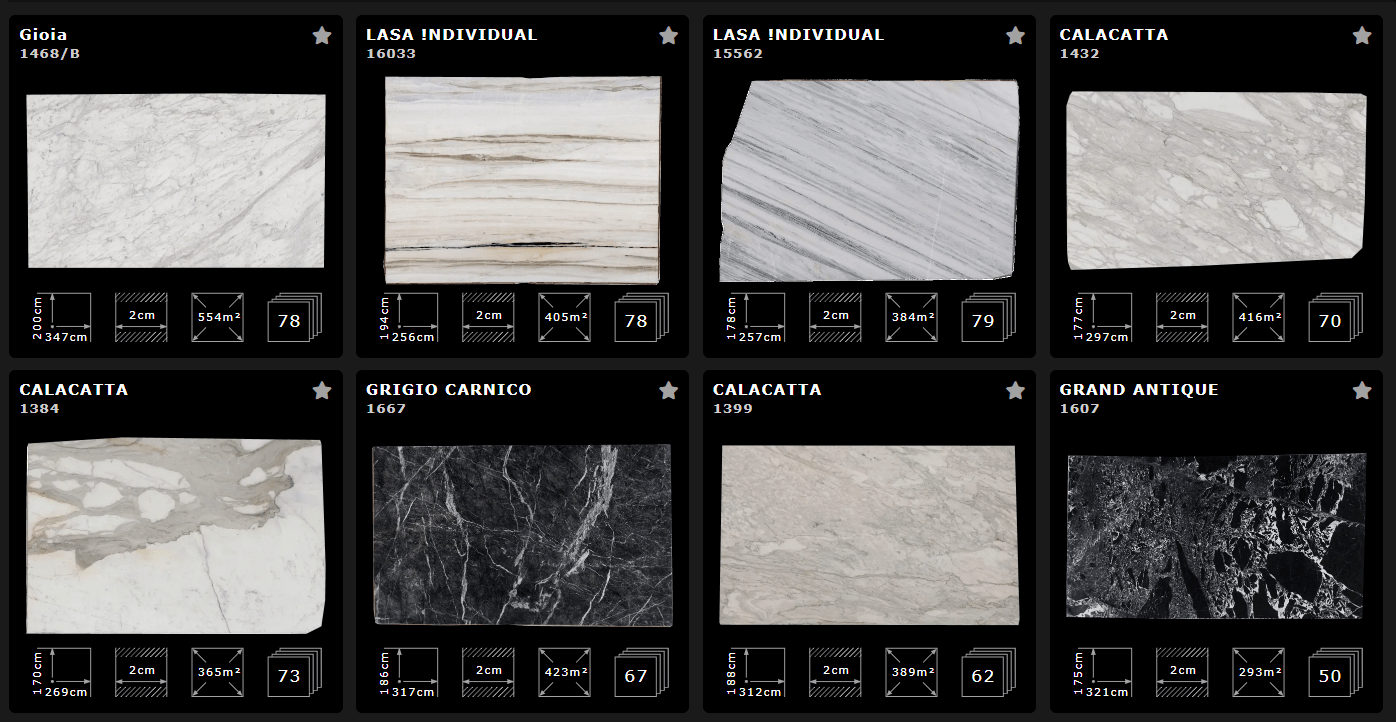
High-resolution slab gallery with live data
The entire inventory is presented in a modern gallery view. Customers see high-resolution photos, filter by material, color and size, and switch between slab and block views. Live availability is linked directly to the images.
- Slab and block views with high-resolution photos
- Filter options by color, material, thickness, surface
- Live availability visible directly in the gallery
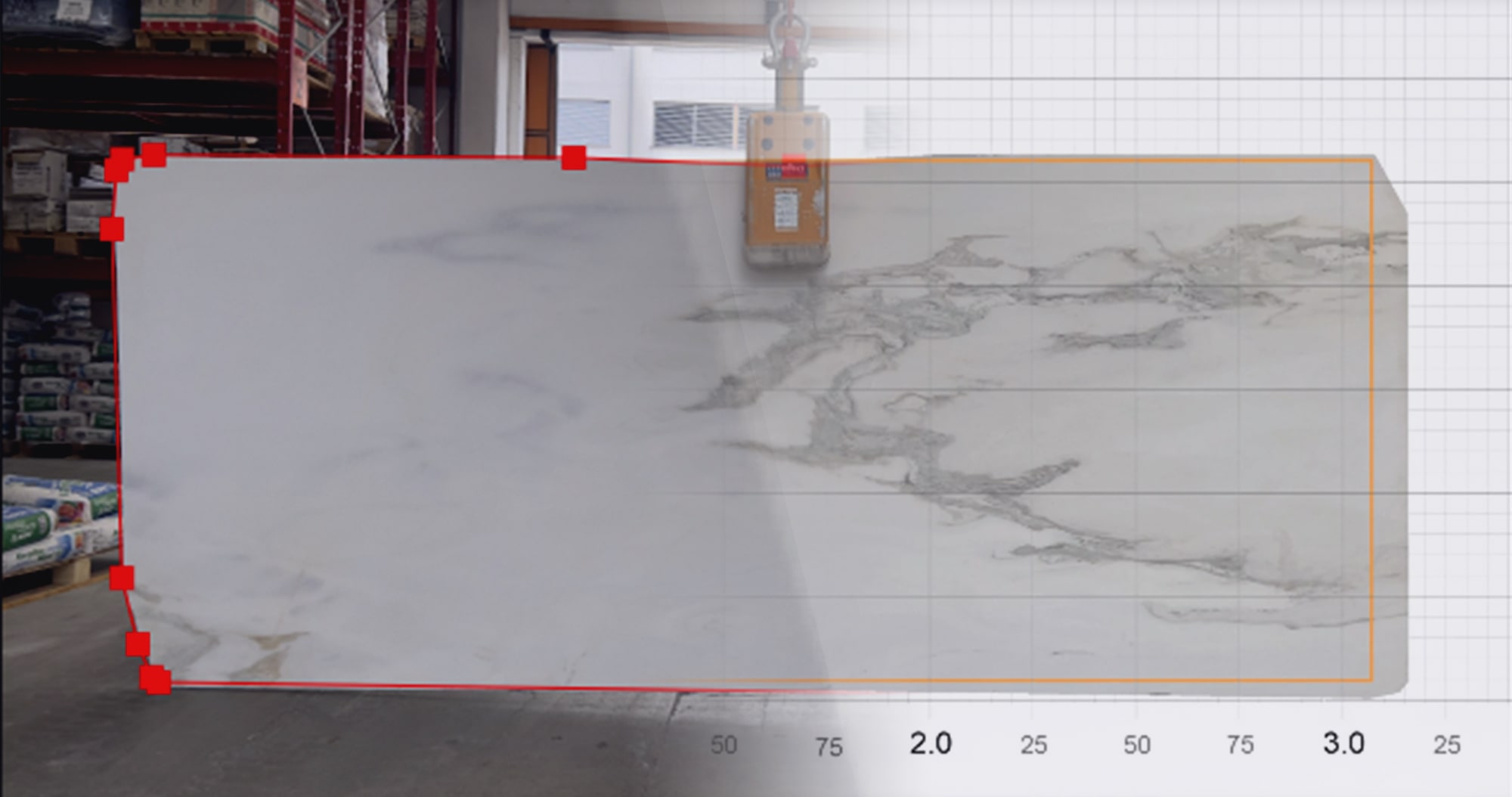
Multiple paths to a digital slab
Smartphone, photo station or scanner, DDL supports different digitization paths. AI detects contours, calculates dimensions and processes photos automatically via AI-path and masking for the gallery.
- Smartphone, photo booth or scanner, flexibly combinable
- AI-based contour detection and dimension calculation
- AI-path and masking for clean gallery presentation
Connect suppliers and resellers digitally
Supplier inventory can be seamlessly integrated into the gallery, their material appears there even though it is physically at the supplier. Resellers can be given targeted access to build entire partner ecosystems.
- Display supplier material in your own gallery
- Reseller access with individual permissions
- Cross-company inventory for sales and planning
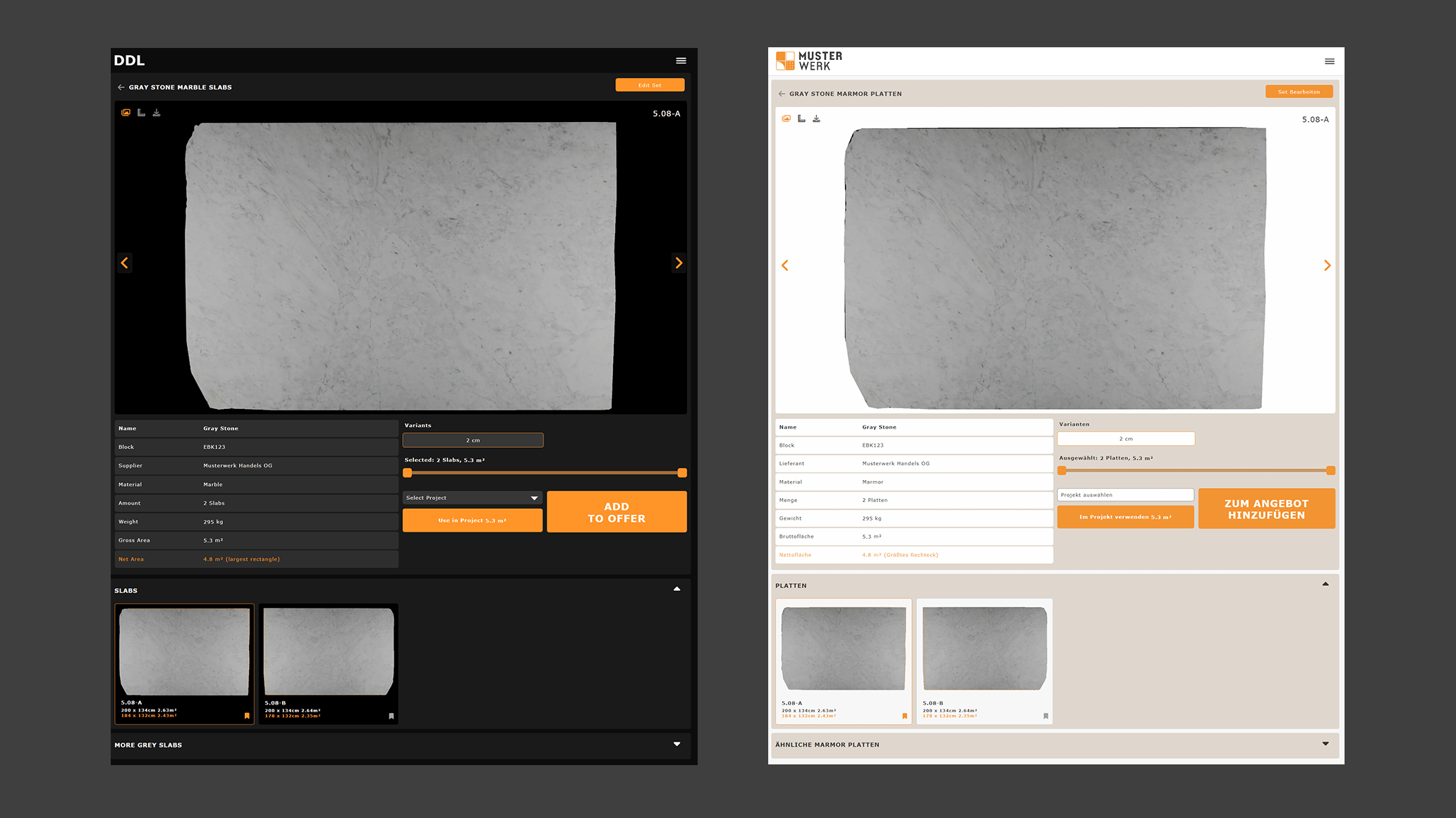
Embed gallery in your website
The DDL gallery can be integrated into any company website via embed or iFrame. The design is adapted to the corporate design, customers experience the gallery as part of the company's own presence.
- Embed or iFrame integration into any website
- Full CI customization: colors, logo, fonts
- Operation under your own domain possible
Showroom / Catalog vs. DDL Customer Portal
Where traditional sales channels reach their limits, a digital warehouse opens new possibilities.
Our goal is to always offer our customers the best selection. Through the seamless integration of our partners' inventory via the DDL platform, we come significantly closer to this goal. Thanks to DDL, we are more flexible in sales and significantly faster at closing.

Frequently asked questions about the customer portal
Show the warehouse to the world
Present the natural stone inventory online and reach new customers? In a personal demo, the DDL team shows how the warehouse can be turned into a digital sales channel, with gallery, partner network and visibility controls.